
How to Get WhatsApp Business API in Pakistan (and the Green Tick)
How to get the WhatsApp Business API in Pakistan is a question we hear from shops, clinics, schools and online stores every week. The free WhatsApp Business app works well until messages pile up, several staff need to reply from one number, or you want an automatic bot to answer at night. That is when you need the WhatsApp Business Platform, usually called the WhatsApp API.
This guide walks you through what the API is, what you need before you apply, the setup steps, how the green tick (now a blue verified badge) works, and the rules that keep your number safe. Costs are covered in a separate guide on WhatsApp API pricing in Pakistan.
What the WhatsApp Business API is
The WhatsApp Business Platform is Meta’s official system for businesses that message customers at scale. Meta describes it as a developer product, not a phone app: there is no WhatsApp screen to open. Instead, your number is connected to software, such as a shared inbox, a CRM or an AI chatbot, and messages are sent and received through it. You can read Meta’s own overview on the WhatsApp Business Platform documentation.
Most businesses today use the Cloud API, which Meta hosts. You do not run any servers for WhatsApp itself; you only need the software that talks to it.
App or API: which do you need?
| WhatsApp Business app | WhatsApp Business API | |
|---|---|---|
| Who replies | You, on a phone (and a few linked devices) | A whole team, from one shared inbox |
| Automation | Basic greeting and away messages | Full chatbots, AI agents and CRM workflows |
| Broadcasts | Limited, to contacts who saved your number | Approved message templates to customers who opted in |
| Cost | Free | Meta charges for some message types, plus your software |
| Best for | A small shop answering a manageable number of chats | Businesses with many chats, several staff or a bot |
If you only answer a handful of messages a day yourself, the free app is fine. Move to the API when you are missing chats, need more than one person on the number, or want a WhatsApp AI bot to qualify leads around the clock.
What you need before you start
- A Meta business portfolio (formerly Business Manager). Meta says you must have one to use the platform.
- A phone number that can receive a verification code by SMS or call. Meta allows real or virtual numbers. If the number is already used on the WhatsApp or WhatsApp Business app, plan carefully, because moving it to the API changes how you use it on your phone.
- Business documents for verification, such as your registration details and a website or utility bill that shows the same business name and address.
- A website that clearly shows your business name, what you sell and how to contact you, matching the details in your documents. Verification goes more smoothly when everything matches.
- A display name that matches your business, not a generic keyword.
- A payment method in Meta’s billing, for paid message types.
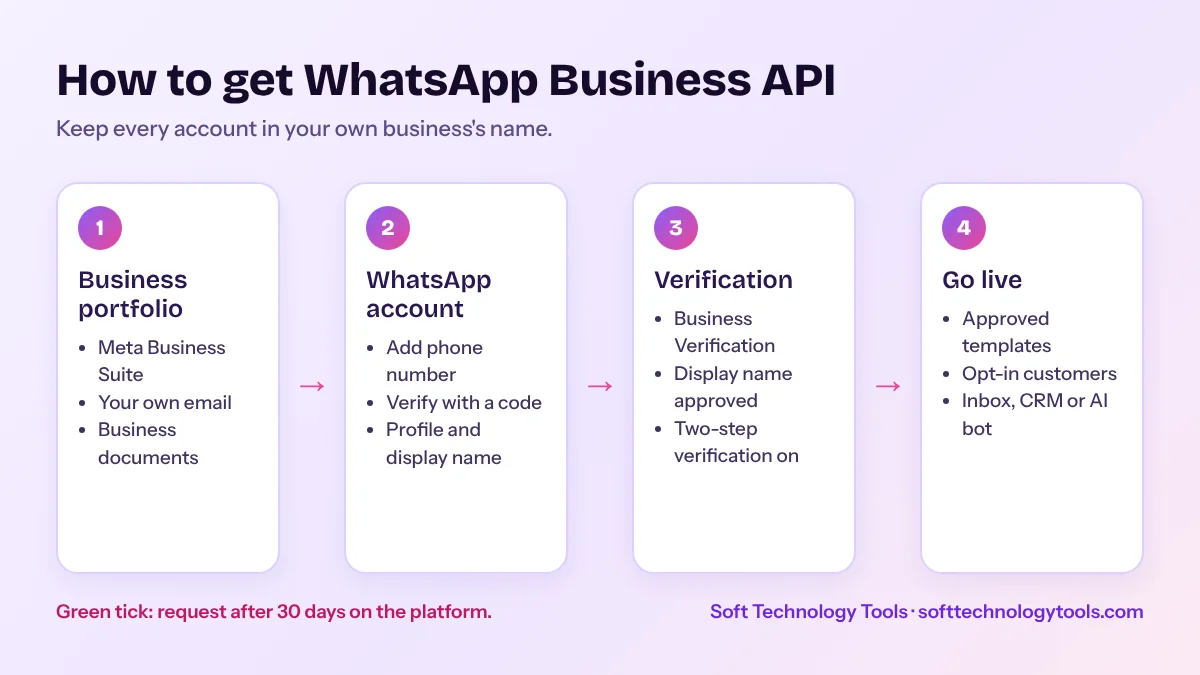
How to get the API, step by step
- Set up your business portfolio in Meta Business Suite, using the business’s own email, not a freelancer’s.
- Choose how you connect. You can connect directly to Meta’s Cloud API through a developer, or through a Business Solution Provider whose inbox or chatbot software you use. Either way, make sure the WhatsApp account sits in your own business portfolio.
- Create the WhatsApp Business Account and add your phone number. You will verify it with a code.
- Add the display name and business profile: logo, description, address, email and website.
- Start Business Verification in Meta’s Security Centre. Verification unlocks higher limits and is needed for the verified badge later.
- Create message templates for the messages you send first, such as order updates or appointment reminders. Templates generally need Meta’s approval before you can use them.
- Connect your software: a shared inbox, CRM or AI bot, and test every flow with real phones before going live.
Meta reviews display names automatically when your number reaches higher messaging limits, and again whenever you change the name. Your name shows in chat threads only after it is approved, according to Meta’s display name documentation.
The green tick and the verified badge
People still search for the “WhatsApp green tick”, but Meta now calls it an Official Business Account, shown with a blue checkmark next to the business name. It tells customers the number really belongs to your business.
According to Meta’s Official Business Account documentation, a number can request the badge when:
- the business follows the WhatsApp Business Messaging Policy;
- it has been on the WhatsApp Business Platform for at least 30 days;
- the business portfolio that owns the number has passed Business Verification;
- two-step verification is turned on for the number; and
- the display name has been approved.
You submit the request in WhatsApp Manager, under the phone number’s profile. If it is rejected, Meta says you must wait 30 days before you apply again. A rejection does not stop you messaging customers, and you can keep improving your business profile in the meantime.
Rules that keep your number safe
- Get opt-in first. Customers must agree to receive messages from you before you send them templates, and the opt-in should name your business. See Meta’s guide on getting opt-in.
- Use templates outside the reply window. When a customer messages you, you can reply freely for a limited time. After that, only approved templates can start the conversation again.
- Watch your quality rating. If many people block or report your messages, your limits can drop. Send fewer, more useful messages.
- Follow the policy. Read the WhatsApp Business Messaging Policy; some products and message types are not allowed.
Common mistakes
- Buying “bulk WhatsApp” software that uses unofficial tools. Numbers used this way are often banned. Only the official platform is safe.
- Letting someone else own the account. If an agency or freelancer creates the business portfolio in their name, you can lose the number. Keep ownership with the business.
- A website that does not match. Verification often fails when the business name, address or contact details differ between documents and website.
- Sending promotions to everyone. Message people who asked to hear from you, and keep marketing messages relevant.
- No plan for replies. The API brings more conversations. Without a bot or a team process, chats still go unanswered. A CRM with follow-ups keeps every lead tracked.
Frequently asked questions
How do I get WhatsApp Business API in Pakistan?
Create a Meta business portfolio, add a WhatsApp Business Account and phone number, complete Business Verification, and connect software through Meta’s Cloud API directly or through a Business Solution Provider. Keep the account in your own business’s name.
Is WhatsApp Business API free?
No. Meta charges for some message types, and you also pay for the software you use with it. See our guide to WhatsApp API pricing in Pakistan for how charges work.
How do I get the WhatsApp green tick?
Request an Official Business Account in WhatsApp Manager once your business is verified, your display name is approved, two-step verification is on, and the number has been on the platform for at least 30 days. Meta decides each request.
Can I keep using WhatsApp on my phone with the API?
The API is used through software, not the normal phone app. Some setups let you keep using the app alongside the API, but it depends on your provider and number, so check before you move an existing number.
Can you set up WhatsApp API for my business?
Yes. Soft Technology Tools sets up the official WhatsApp Business Platform, AI chatbots and shared inboxes for businesses in Pakistan, the UAE, the UK and the USA, from our offices in Lahore and Karachi. You own the account and every login, and you get a fixed written quote after a free call. Get a quote or message us on WhatsApp.
Related guides
POS Software in Pakistan: Ready-Made or Custom?
POS software in Pakistan: a feature checklist, ready-made vs custom compared, and what FBR POS integration means for Tier-1 retailers…
Ghost Touch Problem Solution for Android and iPhone
Ghost touch problem solution for Android and iPhone: check the protector, charger, moisture and touch settings, test the screen, or get it…
WordPress Website for Business in Pakistan: Pros and Cons
WordPress website development services in Pakistan: honest pros and cons, hosting requirements, security and updates, and when Shopify or…