
AI Chatbot for Lead Generation: WhatsApp, Website and CRM
An AI chatbot for lead generation answers enquiries on WhatsApp and your website at any hour, asks the right questions, and sends qualified leads straight into your CRM. For a business in Pakistan, where many customers message late at night or after seeing an ad, it means fewer leads lost to slow replies and a clearer picture of who is ready to buy.
This guide explains how WhatsApp and website AI chatbots capture and qualify leads, how they connect to a CRM, and what a good setup looks like for shops, clinics, real estate and online stores. It also covers the rules to follow and the mistakes to avoid.
Why leads go cold
Most businesses do not lose leads because their product is wrong. They lose them because nobody replied in time, or the reply did not answer the question. A customer who messages three shops about the same phone, flat or treatment usually buys from the one that answers first and clearly.
The usual problems look like this:
- Messages arrive at night, on weekends and during busy hours
- Staff answer the same questions about price, location and stock all day
- Leads are kept in personal phones and notebooks, so follow-ups are missed
- Nobody knows which ad or page brought in the customers who actually bought
An AI chatbot fixes the first two by replying instantly. Connected to a CRM, it fixes the last two as well.
How an AI chatbot captures and qualifies leads
An AI chatbot is trained on your own information: products or services, prices, locations, timings and policies. When someone sends a message, it understands the question, even if it is written in Roman Urdu or a mix of Urdu and English, and replies from that information.
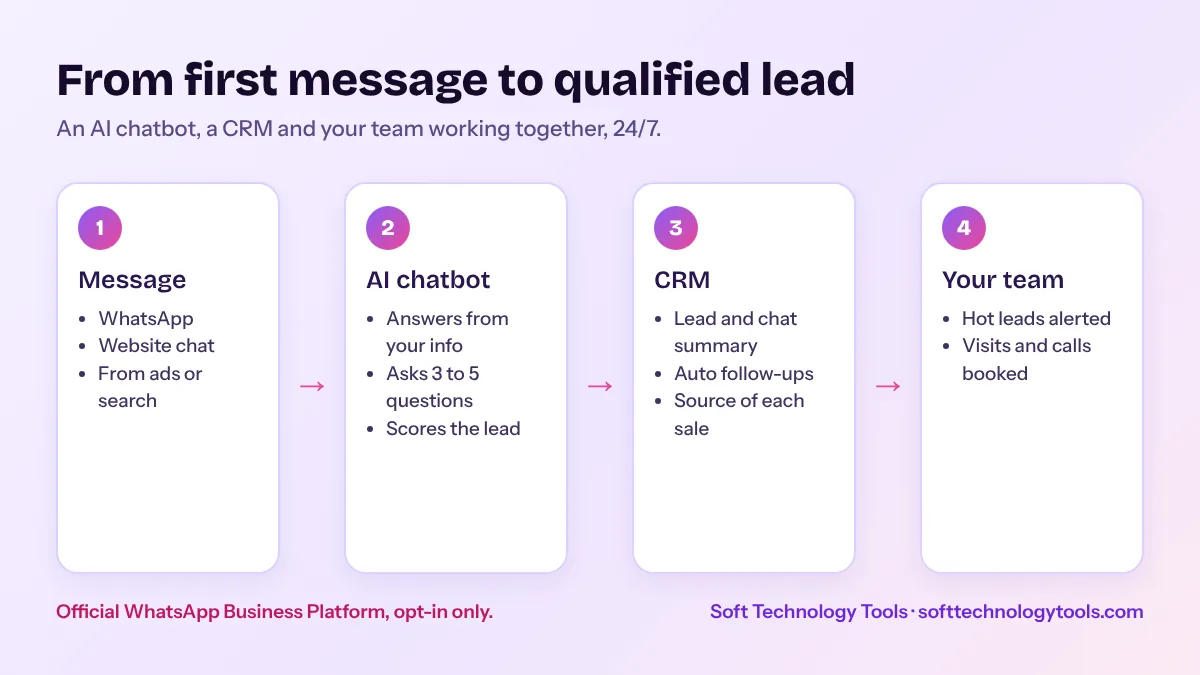
For lead generation, the chatbot follows a simple flow:
- Greet and answer. Reply to the customer’s first question straight away.
- Ask qualifying questions. The same ones your best salesperson asks, such as budget, location, timing and what exactly they need.
- Capture details. Name, number and any details needed to follow up.
- Score the lead. Mark it as hot, warm or just looking, based on the answers.
- Hand over or book. Pass hot leads to a person immediately, or book a call, visit or appointment.
- Save to the CRM. Every lead, answer and chat summary goes into one place.
Good qualifying questions are short and few. Three to five questions are usually enough. Asking more than that in a chat makes people drop off.
WhatsApp chatbot vs website chatbot
Most businesses in Pakistan need WhatsApp first, because that is where customers already talk to them. A website chatbot adds value when your site gets steady visitors from search or ads.
| WhatsApp AI chatbot | Website AI chatbot | |
|---|---|---|
| Where customers find it | Their WhatsApp, from ads, your number or a click-to-chat link | A chat window on your website |
| Best for | Ongoing conversations, follow-ups, order updates | Visitors researching before they contact you |
| Can message the customer later | Yes, within WhatsApp’s rules and with opt-in | Only if they leave a number or email |
| Setup | Official WhatsApp Business Platform account | A widget added to your site |
| Running costs | AI usage plus WhatsApp message charges | AI usage |
Many businesses use both, with the website chatbot offering to continue the chat on WhatsApp. Both should send leads into the same CRM so nothing is split across systems.
Connecting the chatbot to your CRM
A chatbot without a CRM answers questions. A chatbot with a CRM builds a sales pipeline. Once they are connected:
- Each new lead appears in your pipeline with their answers and a chat summary
- Hot leads are assigned to the right salesperson, who gets an alert
- Automatic follow-ups go out by WhatsApp, email or SMS if a lead goes quiet
- You can see which ads, pages and campaigns brought in leads that turned into sales
- Managers see the whole team’s leads in one dashboard instead of on staff phones
If you are still keeping leads in spreadsheets, our guide on CRM setup and automation explains what to set up first.
Examples by industry
Shops and retail
A mobile or electronics shop gets the same questions all day: price, stock, PTA status, delivery and installment options. The chatbot answers from your current price list, asks which model and budget the customer has in mind, and passes ready buyers to your counter staff with the details already collected.
Clinics
A clinic chatbot answers questions about timings, doctors and services, and books or requests appointments. It collects the patient’s name and preferred time and passes the request to reception. It should never give medical advice. Anything clinical goes to a person.
Real estate
Property ads bring in many enquiries, but only some are serious. The chatbot asks about area, budget, buying or renting, and timeline, then shares matching listings and books viewings for serious buyers. Agents spend their time on people ready to visit, not on first questions.
E-commerce
An online store chatbot answers sizing, delivery and return questions, helps customers find products, and recovers people who stopped before checkout. It can also take order status questions off your team’s hands by checking the order system.
Rules to follow
A chatbot represents your business, so it should be honest and follow the platform’s rules.
- Use the official platform. We connect WhatsApp chatbots through the official WhatsApp Business Platform, not unofficial tools that risk your number being banned.
- Get opt-in. WhatsApp’s Business Messaging Policy says you may only message people who gave you their number and agreed to hear from you, and you must honour opt-out requests.
- Offer a person. The same policy requires a clear way to reach a human, such as a transfer to an agent or a phone number.
- Answer only from your information. The bot should say it will check with the team rather than guess a price or promise.
- Protect customer data. Collect only what you need, and limit who can see it.
Common mistakes
- Out-of-date prices. The bot is only as good as its information. Update it when prices change.
- Too many questions before the customer gets a useful answer
- No human handover, leaving frustrated customers stuck with the bot
- No CRM, so leads are captured but never followed up
- Launching without testing on real customer questions, including Roman Urdu and spelling mistakes
Deciding how much to automate and when to bring in a person is covered in our guide to WhatsApp AI chatbots vs human agents.
How to get started
Start small. Pick one channel, usually WhatsApp, and one goal, such as qualifying ad leads. Collect the questions customers ask most and your current prices, decide your qualifying questions, and agree who receives hot leads.
At Soft Technology Tools we build WhatsApp and website AI chatbots trained on your products and prices, in Urdu and English, connected to your CRM with automatic follow-ups. You get a written scope and a fixed price after a free call, and you own every account and login. See our WhatsApp AI chatbot service, visit our home page for all our AI services, or contact us and we reply within one working day.
Frequently asked questions
What is an AI chatbot for lead generation?
It is a chatbot trained on your business that answers enquiries, asks qualifying questions, collects contact details and sends leads to your CRM or sales team, at any time of day.
Can an AI chatbot reply in Urdu and Roman Urdu?
Yes. Modern AI models understand Urdu, Roman Urdu and English, including mixed messages. We test with real customer questions before launch.
Is a WhatsApp chatbot better than a website chatbot?
For most businesses in Pakistan, WhatsApp comes first because customers already use it. A website chatbot helps when your site has steady traffic. Many businesses use both, connected to one CRM.
Will the chatbot replace my sales team?
No. It handles first replies and qualification so your team spends time on serious buyers. Hot leads and complex questions are passed to a person.
Do I need a CRM for a chatbot?
Not to start, but it is strongly recommended. Without a CRM, leads collected by the chatbot are easy to lose and hard to follow up.
How much does an AI chatbot cost in Pakistan?
It depends on channels, integrations and message volume. STT gives a fixed written quote after a free call. WhatsApp message charges are separate and set by Meta.
Is it allowed to use a chatbot on WhatsApp?
Yes, through the official WhatsApp Business Platform, when you follow its policy: message only people who opted in, honour opt-outs and offer a way to reach a person.
خلاصہ (اردو)
- لیڈ جنریشن کے لیے اے آئی چیٹ بوٹ واٹس ایپ اور ویب سائٹ پر دن رات فوراً جواب دیتا ہے، اہم سوالات پوچھتا ہے اور سنجیدہ گاہکوں کو آپ کی ٹیم تک پہنچاتا ہے۔
- سی آر ایم سے جڑنے پر ہر لیڈ ایک جگہ محفوظ ہوتی ہے، خودکار فالو اپ جاتے ہیں اور پتا چلتا ہے کہ کون سا اشتہار فروخت لایا۔
- دکانوں، کلینکس، رئیل اسٹیٹ اور آن لائن اسٹورز کے لیے مفید ہے۔ کلینک بوٹ کبھی طبی مشورہ نہیں دیتا۔
- صرف آفیشل واٹس ایپ بزنس پلیٹ فارم استعمال کریں، صرف اجازت دینے والوں کو میسج کریں اور انسان سے بات کا راستہ رکھیں۔
- STT مفت کال کے بعد تحریری فکسڈ قیمت دیتا ہے۔
Khulasa (Roman Urdu)
- AI chatbot WhatsApp aur website par 24 ghante foran jawab deta hai, sawal poochta hai aur serious customers aap ki team tak pohanchata hai.
- CRM se jurne par har lead ek jagah save hoti hai aur follow-up khud jata hai.
- Shops, clinics, real estate aur online stores ke liye faidamand hai.
- Sirf official WhatsApp Business Platform use karein aur insaan se baat ka option rakhein.
Related guides
Display Problem in Mobile: Lines, Flicker and Black Screen Fixes
Display problem in mobile? Tell software from hardware with a screenshot test, then fix lines, flicker and black screen step by step…
POS Software in Pakistan: Ready-Made or Custom?
POS software in Pakistan: a feature checklist, ready-made vs custom compared, and what FBR POS integration means for Tier-1 retailers…
Ghost Touch Problem Solution for Android and iPhone
Ghost touch problem solution for Android and iPhone: check the protector, charger, moisture and touch settings, test the screen, or get it…